



Tubi, The Roku Channel, and Pluto TV are the real answers. Everything else on this page fills a specific gap: no ads, live channels, or your own media files.
Most lists that promise free Netflix alternatives pad themselves with live-TV apps, which answer a different question entirely. If what you want is the Netflix experience, meaning you open an app, browse a wall of posters, and press play, only a handful of free services actually deliver it.
All nine picks here are licensed and legal, and none of them asks for a credit card. The trade is ads, and later on there is a section about the sketchy shortcuts people recommend on Reddit, because pretending they don’t exist helps nobody.
What “like Netflix” actually means when it’s free
A free Netflix replacement needs an on-demand library you browse and press play on, apps on every device, and resume across them. Live TV channel apps answer a different craving entirely.
That distinction matters more than any ranking. Netflix trained everyone to expect a personal catalog: profiles, a resume button that follows you from phone to TV, and rows tuned to what you watched last week.
Roughly half the “free Netflix” apps people recommend are linear channel services, where you drop into a stream already in progress. That’s television, and it can be great, but it is not what someone canceling Netflix is trying to replace.
One more reason old lists mislead: the free streaming market keeps shifting under your feet. Amazon shut down Freevee and folded its content into Prime Video, so any list still leading with it was written a while ago.
Tubi comes closest to a free Netflix
Tubi is the closest free stand-in for Netflix: an on-demand catalog of roughly 250,000 movies and episodes, personalized rows, profiles, and apps on practically every platform, with no payment details requested at any point.
The catalog is the whole argument. Tubi carries more titles than Netflix, Prime Video, and Max combined, though the mix leans toward back-catalog films, older network shows, and a deep pool of genre movies rather than this year’s prestige dramas.
That depth is also its charm. Scroll it at 11 p.m. and you’ll surface some 1980s horror film you have never heard of, sitting next to a documentary and a fully licensed action movie that left Netflix two years ago.
Owned by Fox, Tubi licenses everything properly and now produces its own originals. It also has a live news tab and a kids section, so the household screens are covered without a second app.
The catch is ads you cannot pay to remove. Expect a pre-roll and breaks that total somewhere around four to six minutes per hour, and yes, sometimes one lands mid-sentence in a way that makes you want to throw the remote.
The other catch is rotation. Because licenses churn, the movie you saved for the weekend can quietly vanish, so treat your watchlist as a suggestion rather than a promise.
The Roku Channel: free originals and a fast-growing catalog
The Roku Channel is the only free service producing originals worth planning an evening around, and despite the name it runs on phones, browsers, Fire TV, and Samsung sets, not just Roku players.
Roku bought the entire Quibi library and rebranded those shows as Roku Originals, then kept commissioning new ones. Add a rotating pile of licensed movies and shows, plus hundreds of free linear channels, and it behaves like a hybrid of Netflix and cable.
Its on-demand shelf is smaller than Tubi’s, but it is curated harder. The front page usually surfaces a few movies you’d genuinely pick on a Friday night instead of burying them under forty rows.
You don’t need a Roku account to start watching on a Roku device, though creating one lets you sync progress across the mobile app and the web player. Ad load feels similar to Tubi’s, sometimes lighter on movies.
Pluto TV, Samsung TV Plus, and Sling Freestream: for channel surfers
Pluto TV, Samsung TV Plus, and Sling Freestream recreate cable rather than Netflix. You get hundreds of scheduled channels for background watching, and each keeps a smaller on-demand shelf on the side.
Pluto TV is the biggest of the three, with around 400 linear channels and no sign-up at all. Whole channels loop single shows, so there is one that plays nothing but a single sitcom all day, which is either a bug or the entire point depending on your mood.
Samsung TV Plus comes preinstalled on Samsung TVs and Galaxy phones and has grown a real on-demand section. If you own Samsung hardware it is already sitting on your home row, which makes it the laziest possible win.
Sling Freestream stands out for volume, roughly 650 free channels, and for working without an account. It doubles as a storefront for paid Sling plans, so expect it to upsell you occasionally.
Pick one of these when what you actually miss is surfing, not searching. When you know the movie you want, you will be back in Tubi within ten minutes.
Kanopy and Hoopla: zero ads if you have a library card
Kanopy and Hoopla are the only genuinely ad-free options here, and both cost nothing if you hold a card from a participating public library or attend a partnered university.
Kanopy is the film lover’s pick, stocked with A24 titles, Criterion-adjacent classics, festival documentaries, and world cinema. Libraries fund your watching through a monthly allotment of play credits, so you budget a handful of films rather than bingeing.
Hoopla covers broader ground, with movies, shows, audiobooks, comics, and music borrows in one app. Its monthly borrow limits are set by each library, commonly somewhere between four and ten items.
Signing up takes five minutes with a card number, and many library systems let you register for the card itself online. For a lot of people this is the single most underused free benefit they already pay taxes for.
Plex and YouTube: the two everyone forgets
Plex streams your own files from a personal server and pairs that with a licensed free catalog, while YouTube quietly hosts thousands of full, legal, ad-supported movies most people never search for.
Plex started as a way to organize media you already own, and that is still its best trick: rip your DVD shelf once and every TV in the house gets a private Netflix with your stuff on it. The company later bolted on tens of thousands of free ad-supported movies plus live channels, no server required.
YouTube’s free-with-ads movie section hides under Movies & TV rather than the home feed. The selection rotates and skews mainstream, but finding a proper studio film in there still feels like getting away with something.
Neither should be your only app. Both are the ones you’re glad exist when the others fail you on a specific title.
Apps like Netflix but free: quick comparison
Every option below is legal, licensed, and free at the tier described. The table compares what people actually ask about: the kind of library, the ads, whether you need an account, and where it runs.
| App | Library type | Ads | Account needed | Where it runs |
|---|---|---|---|---|
| Tubi | Huge on-demand catalog | Yes | Optional | Phones, web, smart TVs, sticks, consoles |
| The Roku Channel | On-demand + originals + live | Yes | Optional | Roku, phones, web, Fire TV, Samsung TVs |
| Pluto TV | Live channels + small on-demand | Yes | None | Phones, web, smart TVs, sticks |
| Samsung TV Plus | Live channels + on-demand | Yes | None | Samsung TVs and Galaxy devices |
| Sling Freestream | Live channels, about 650 | Yes | None | Phones, web, Roku, Fire TV, Xbox |
| Kanopy | Curated films, credit-based | No | Library card | Phones, web, smart TVs, sticks |
| Hoopla | Movies, shows, books, comics | No | Library card | Phones, web, smart TVs, sticks |
| Plex | Your files + free catalog | On free catalog | Yes, free | Almost everything |
| YouTube | Rotating free movie shelf | Yes | Optional | Everything with a screen |
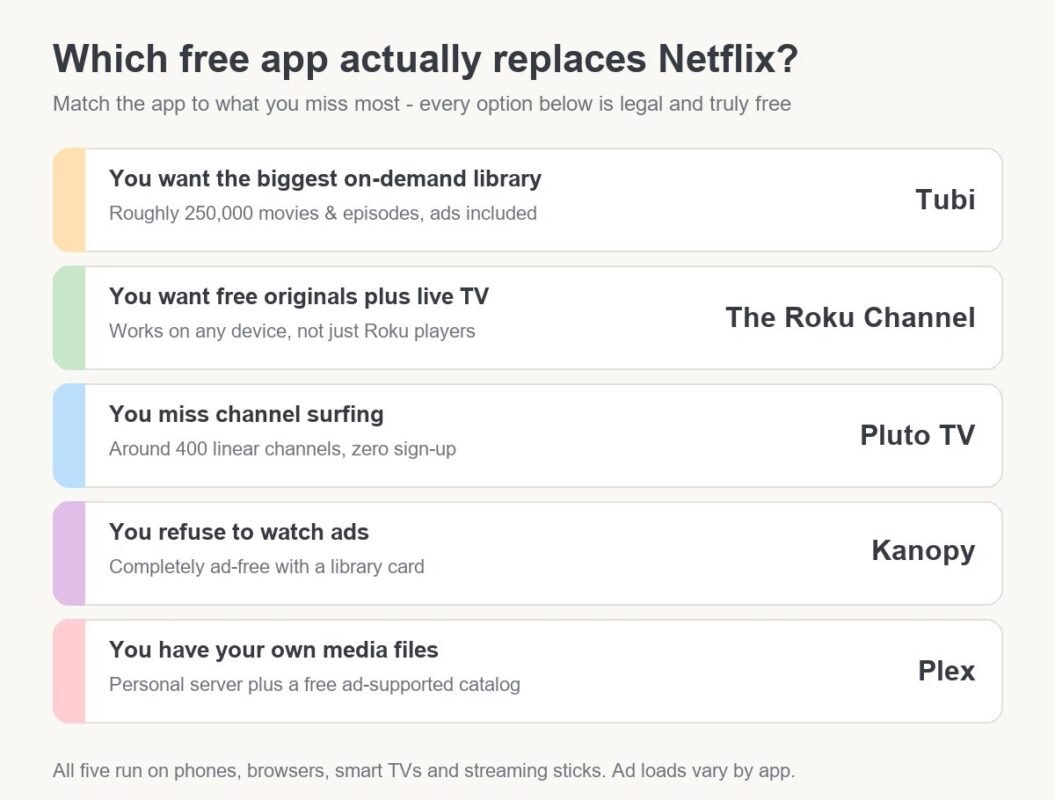
If you install only two, make it Tubi for the library and whichever live-TV app your hardware already carries. Add Kanopy the day the ads start grinding on you.
What about Stremio, Kodi, and the “everything free” apps?
Ask Reddit for apps like Netflix but free and someone names Stremio, Kodi, or a sideloaded APK within minutes. The tools themselves are legal; most of what people actually stream through them is not.
The pattern repeats in every thread on the topic. A person asks for a free Netflix alternative, and the top answers skip past Tubi entirely:
“Stremio or Kodi with real debrid or similar sites.”
– r/sideloaded, December 2025 (5 upvotes)
Here is the honest version. Stremio and Kodi are empty media players; the third-party addons and debrid services people bolt on pull streams from unlicensed sources, which sits somewhere between gray and plainly infringing depending on your country.
Others in the same thread treat the friction as the only real obstacle:
“stremio lite. don’t even need to sideload”
– r/sideloaded, December 2025 (4 upvotes)
Beyond legality, the practical risks are malware in cloned APKs, dead links mid-season, and zero recourse when an app disappears. The nine licensed options above remove all of that in exchange for some commercials, which is a trade most people are happier with than they expect.
Frequently asked questions
Is there a truly free version of Netflix?
No, Netflix has no free tier anywhere; its cheapest option is the ad-supported plan at about $8 a month. Anything advertising itself as free Netflix is either a trial, a scam, or an unlicensed stream.
Are apps like Netflix but free actually legal?
Yes, every app in this article is fully legal because ads or library funding pay for the licenses. Tubi, Pluto TV, and The Roku Channel are owned by Fox, Paramount, and Roku respectively.
Which free streaming app has no ads at all?
Kanopy and Hoopla are ad-free because public libraries cover the licensing, so you need a library card to sign in. Every other free service on this list runs commercials to pay for content.
Do these free apps work on a smart TV?
Yes, all nine run on major smart TV platforms, streaming sticks, or both, and Samsung TV Plus comes preinstalled on Samsung sets. Kanopy and Hoopla have the thinnest TV coverage, so check your model first.
The honest verdict
Free streaming is not a downgrade, it is a different deal: you trade money for patience with ads and for letting go of whatever show everyone is posting about this week. If you need that show, nothing free will scratch it.
For everything else, Tubi plus a library card covers more nights than most people’s three paid subscriptions do. Cancel first, install after, and see how long it takes you to miss the charge.